
Rules
Regulation & bidder guide
By registering and placing a bid on MinAuctions, you agree to participate in good faith and to honour any winning bid you place. All bids are binding once submitted.
Sellers set the starting price and the auction duration. Each lot closes at the advertised end time. Bids placed after the close are rejected automatically by the system.
The highest bidder at the end of the auction is the winner. MinAuctions does not process payments directly; winning bidders and sellers arrange payment and shipping through the contact details provided after the auction.
MinAuctions reserves the right to suspend accounts, remove lots or cancel bids in case of fraud, technical errors or violation of these rules.
Bidder manual
How bidding works on MinAuctions
This manual follows the full journey of a bidder, from creating an account to receiving the specimen you won. Read it once and you will know exactly what happens at every stage, what the rules are and what is expected of you.
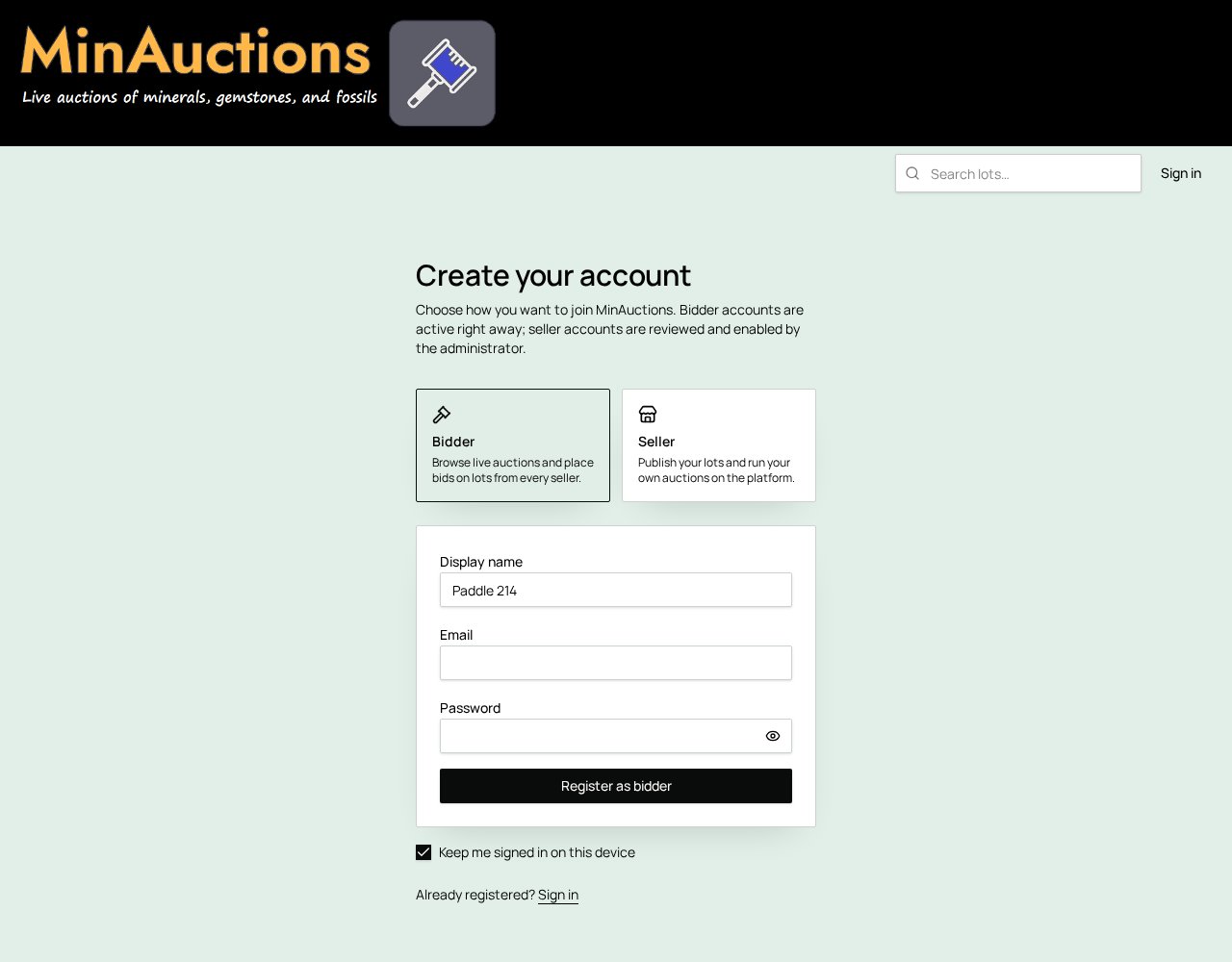
Create your bidder account
Go to Create your account and choose Bidder. Enter a display name (this is the name other users see next to your bids), your email address and a password of at least 6 characters.
Bidder accounts are active immediately — no approval is needed. You will receive a confirmation email: open it and click the link to verify your address. Until your email is verified you cannot sign in.
Tick Keep me signed in on this device if you bid from your own computer or phone. If you forget your password, use Forgot password on the sign-in page to receive a reset link.
Complete your profile
After your first sign-in you are taken to Complete profile. This step is mandatory: sellers need your details to invoice and ship to you.
- Title, first name and last name
- Country, full address, city, county/province and postal code
- Preferred currency
- Telephone number with international dialling code
- VAT number, if you buy as a business
- A separate billing address, if your invoice address is different from your delivery address — tick the dedicated option and fill in the billing fields
You must also accept the terms and conditions to save the profile. Keep these details up to date: invoices and parcels are prepared from exactly what you enter here.
Find lots you like
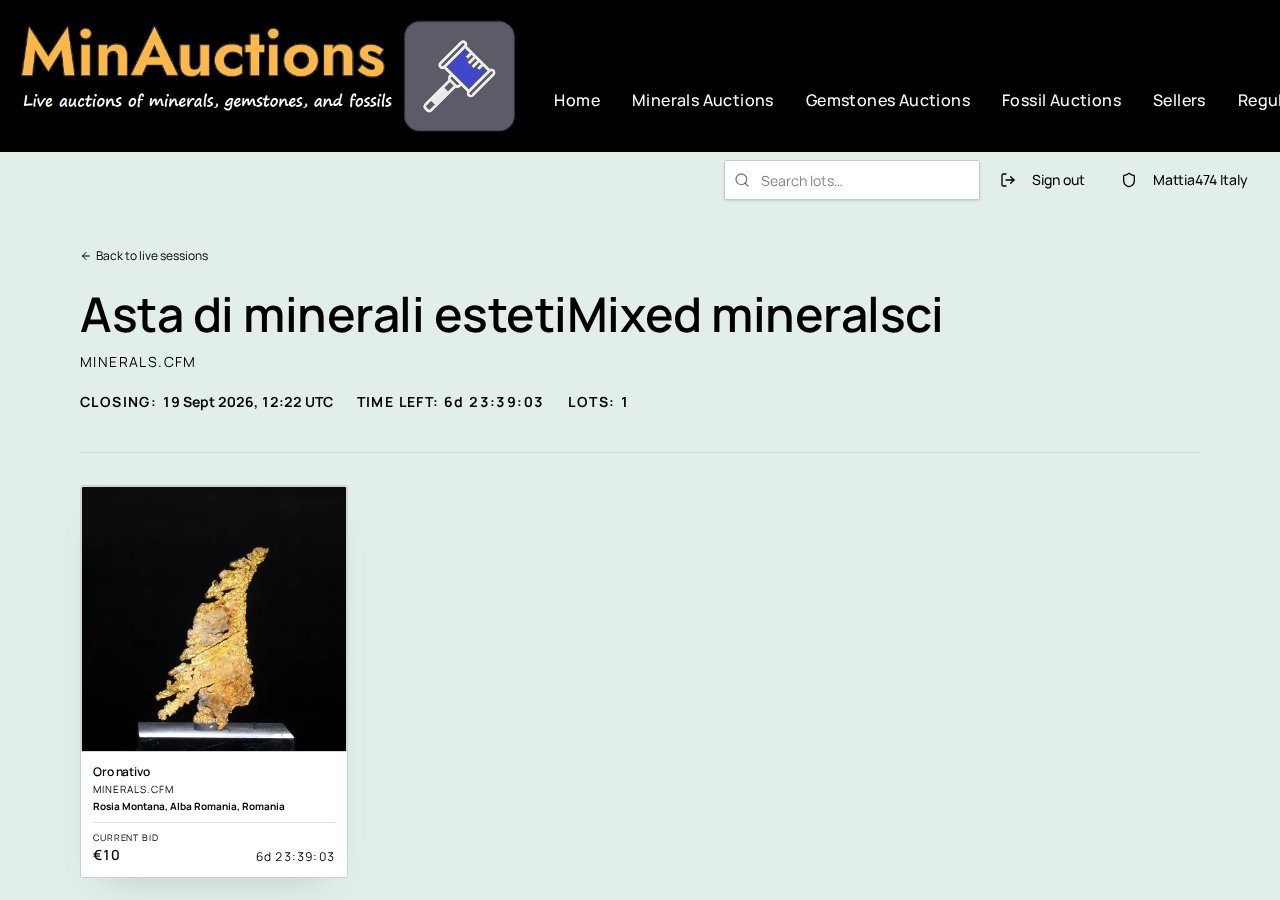
Lots are grouped by category: Minerals, Meteorites and Fossils. Each seller publishes an auction session (a group of lots) with a single closing date, and every session shows the lots it contains.
The search box at the top searches lot titles and descriptions, auction session names, categories, seller names, country and locality of origin, and it also finds closed and already sold lots — useful to check what similar specimens realised in the past. You can also browse a single seller's catalogue from the Sellers directory.
Read the lot page
Before bidding, check everything the lot page tells you:
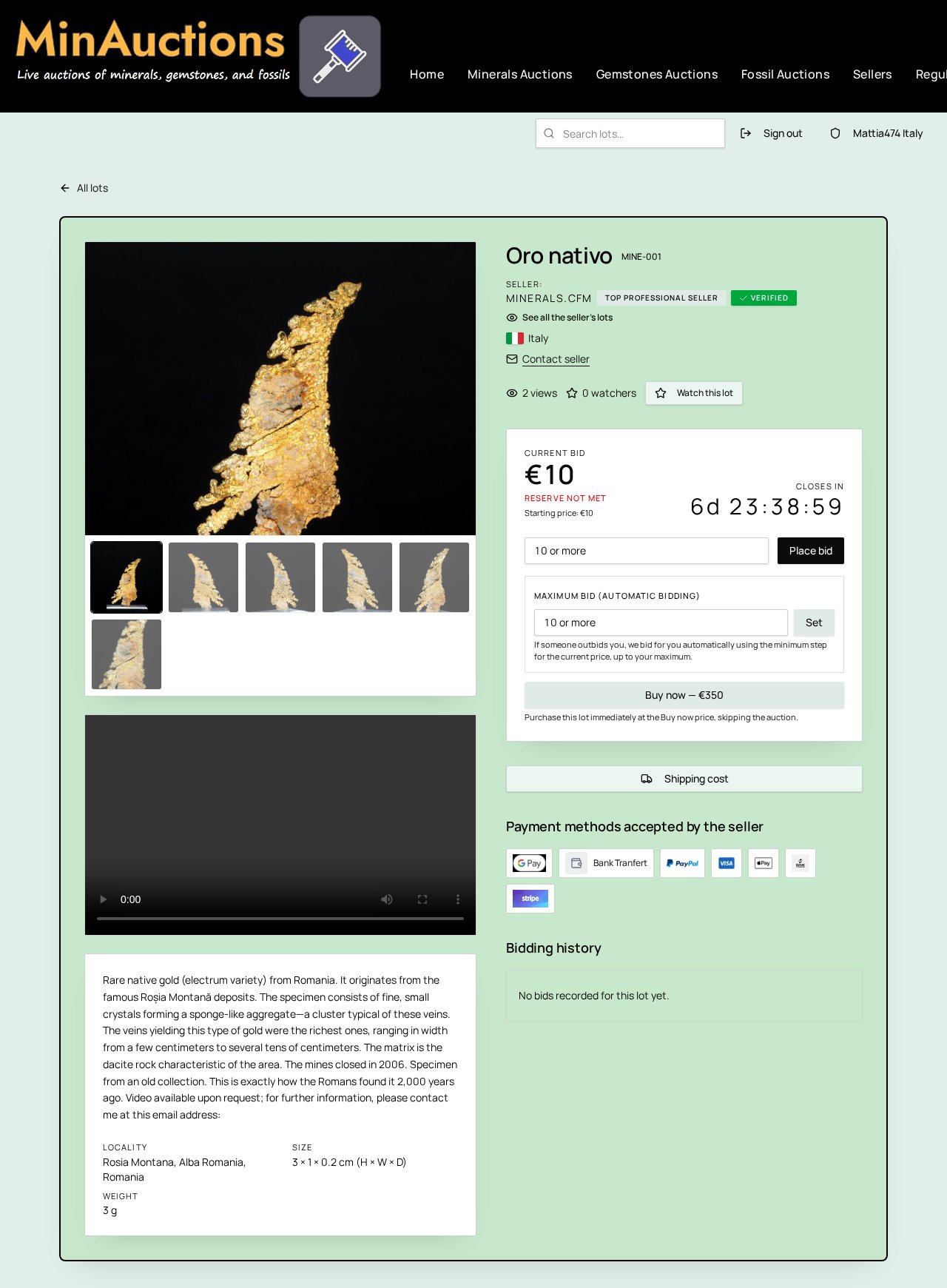
- Photographs — every lot has at least three, plus an optional short video
- Species name, locality and country of origin, and provenance when provided
- Size and weight, given in grams
- Starting price, current hammer price and the closing time with a live countdown
- The seller, their country, their tier badge and whether they are verified
- The payment methods that seller accepts
- The shipping cost to your country
- The full bidding history
If something is unclear, use Contact seller on the lot page to ask a question before you bid. Your question is emailed to the seller and their reply comes back to your email address.
Place a bid
Enter your amount and confirm. Until someone bids, the lot shows its Starting price; after the first bid it shows the Current bid. Prices are in euro, with the US dollar equivalent in brackets, updated daily. The first bid on a lot must be at least the starting price; every following bid must be at least the current price plus the minimum increment, which depends on the price level:
| Current price | Minimum increment |
|---|---|
| up to €20 | €1 |
| €20.01 – €40 | €2 |
| €40.01 – €70 | €3 |
| €70.01 – €100 | €4 |
| €100.01 – €200 | €5 |
| €200.01 – €300 | €6 |
| €300.01 – €500 | €10 |
| €500.01 – €700 | €15 |
| above €700 | €20 |
A bid is a binding commitment to buy. Bids cannot be retracted. You cannot bid on your own lots, on lots that are already closed or sold, and a blocked account cannot bid at all.
Some lots carry a reserve price: if bidding ends below the reserve, the lot is not sold. A seller may lower or remove a reserve during the sale, never raise it.
Automatic bids and Buy Now
Instead of watching the clock, you can set a maximum bid. The system then bids for you, one minimum increment at a time, only as high as necessary, and never above your maximum. Your maximum stays private. If two bidders set the same maximum, the one who set it first stays ahead.
When a lot has a Buy Now price, you can buy it immediately at that price as long as bidding has not yet reached it and the lot is still open. The lot is then closed and assigned to you.
Closing time and extensions
Every lot closes at the time shown on its page, in UTC, with a live countdown. To keep last-second sniping fair, a bid placed in the final 10 minutes pushes the closing time forward by 5 minutes. This can repeat, so a busy lot may run past its original closing time until bidding calms down.
Once bidding is closed, no further bids are accepted and the price shown becomes final.
Winning a lot
When a lot closes, the highest bidder wins, provided any reserve price has been met. Buy Now purchases are assigned immediately.
You receive a “Congratulations — you won” email listing the lots you secured, and the same lots appear under Lots won in your bidder area. Winning emails are sent in batches shortly after closing, so allow a few minutes.
Your invoice
The seller prepares your invoice and sends it to you by email; you can always find it again under My orders for won lots. Each invoice carries its own progressive number and shows:
- One line per lot won, with a thumbnail and the final price
- The shipping cost for your destination
- The total to pay
- Your billing address and delivery address, and the seller's details
- The payment methods the seller accepts, with the details needed to pay
MinAuctions charges bidders no buyer's premium and no platform fee. You pay the hammer price plus shipping only. Any import duties or local taxes in your country remain your responsibility.
If you win several lots from the same seller in the same session, they are normally combined on one invoice with a single shipping cost.
Paying the seller
Payment goes directly to the seller using one of the methods shown on the invoice — for example bank transfer, PayPal, card or the other brands that seller has enabled. Follow the instructions on the invoice and quote your invoice number.
Invoices must be paid within 3 days of issue. The seller marks the invoice as paid once the funds have arrived; from that moment the payment details of the order are frozen and the order moves on to shipping.
If you cannot pay on time, contact the seller straight away. Sellers may report a non-paying bidder 10 days after an invoice has been sent. Reports are reviewed by our administrators, and repeated non-payment leads to your account being blocked, which ends your ability to bid.
Shipping and delivery
Sellers ship within 3 business days of receiving payment. When the parcel leaves, the seller records the carrier and the tracking number on your order, so you can follow the shipment from your bidder area, and you receive a shipping confirmation email.
Shipping costs are set by each seller per destination zone and are shown on the lot page before you bid. Local pickup, where offered, is free.
When the parcel arrives, check the specimen against the lot description and photographs. If anything is wrong — damage in transit, an item that does not match its description — contact the seller first, and open a support ticket if you cannot reach an agreement.
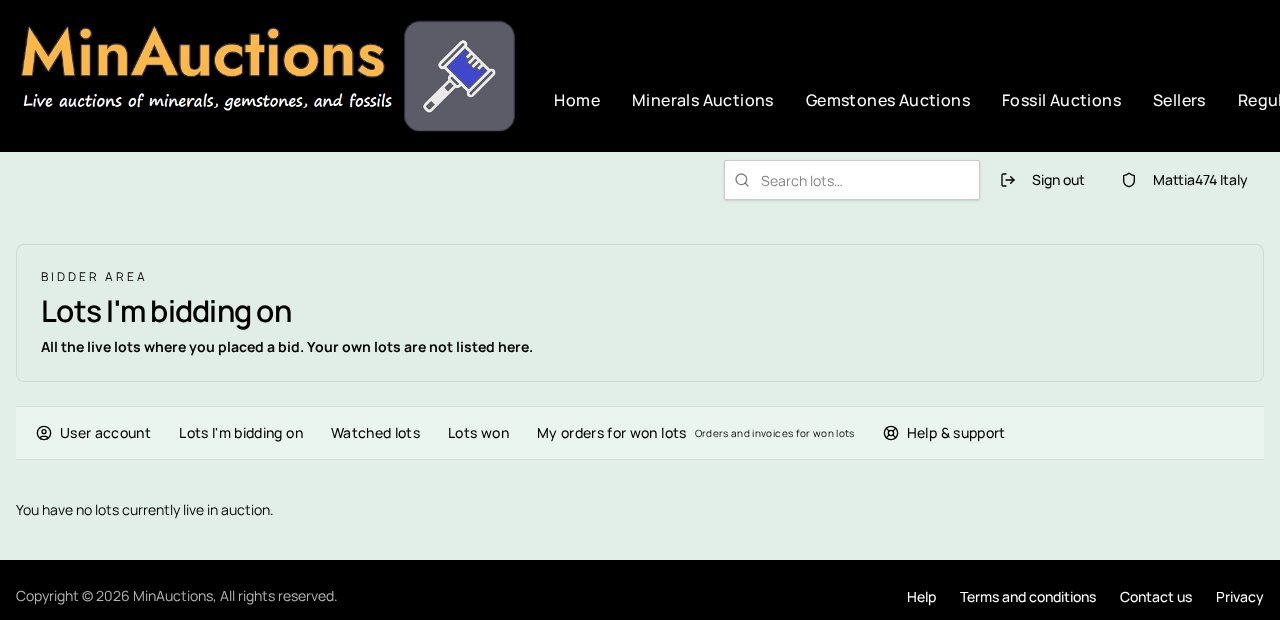
Your bidder area
Everything about your activity lives in one place:
- Lots I'm bidding on — every live lot where you have a bid, with its countdown
- Watched lots — lots you saved to follow, split into live and closed
- Lots won — the lots assigned to you
- My orders for won lots — invoices, payment status, carrier and tracking
- User account — your personal, billing and delivery details
Leave and read seller reviews
After you have received a specimen and checked it, you can leave a public review for the seller. Reviews help other collectors choose trustworthy sellers and let sellers show the quality of their service.
You can review a seller as soon as the invoice for the lot is marked as paid. This applies whether you won the lot by bidding or by using Buy Now. To leave a review, go to Lots won or My orders for won lots, find the paid order and click Leave a review.
- Overall rating — your general satisfaction with the purchase
- Description accuracy — did the specimen match the photographs and description?
- Communication — was the seller clear and responsive?
- Packaging — was the specimen packed safely?
- Shipping speed — did the parcel arrive within the expected time?
- Comment — a short description of your experience (minimum 10 characters)
Once submitted, the review becomes visible on the seller's public profile and next to their lots. You can read reviews left by other buyers by opening any seller's page or by clicking the star rating next to the Verified badge on a lot page. Sellers can reply to reviews, and their response appears together with your comment.
You may edit or update your review while it is visible. Reviews must be honest and respectful; false, abusive or misleading feedback may be removed by our team.
Problems and support
Signed in, open a ticket from Help & support: choose a category, describe the issue and you get a ticket number. Every reply from our team is emailed to you and stays in the ticket thread.
Not signed in, or a general enquiry? Use the contact form. For questions about a specific specimen, the fastest route is always Contact seller on the lot page.
Rules you must respect
- Every bid is binding and cannot be withdrawn.
- Pay each invoice within 3 days of issue.
- One account per person; keep your details accurate and current.
- No bidding on your own lots and no arrangements to inflate prices.
- Communicate through the platform so that we can help if something goes wrong.
- Non-payment, abuse or misuse of the platform leads to suspension or blocking of your account.
The full rules are in the terms and conditions and on this page; your data is handled as described in our privacy policy.
Ready to bid?
Browse the current sessions in Minerals, Meteorites and Fossils, or return to the Help centre.